Tuesday, July 26, 2011

Websites


Great websites


http://Maypasokba.com/


A simple informative and relevant website to inform students if there is classes. This website provides life saving information. The provided information is concise and clear.

The site

As you see the website has a simple clean and clear interface. The headline and the sub text gives the information the site visitors need. The site also has links to the source of the information

PCMAG.com


This website is like is informative in reporting the latest developments in technology. The reviews on the products are reliable and the reports are accurate. The sites home page is organized and the categories are clear. The colors does not hurt the eyes. The articles interest me and they are easy to read and understand. The ads are bearable.


File Hippo


This Website allows users to download free applications from the site itself so users don't have to go to the different websites of each application on their PC. It contains a lot of useful software which are up to date and it also provides older versions of the software.

The ads are well placed and their colors are not distracting. The categorization of the application installers is well done. The centered layout works well and everything seems neat if the ads are removed. The ads are not that neat, but it is organized and it does not hinder any functionality. The ads are also well placed.


Bad websites


This website allows people to download an open prolog but the site itself does not have appeal and its layout makes it hard to read the information displayed. It also lacks a good organizing and it looks like it was not really well thought of unlike the program that can be downloaded from the site.

http://workbench.cadenhead.org


This website was made for one of the authors of teach yourself java in 21 days. The website does not have a good design and the layout is basic. It has little appeal. It was obviously made for the file to help the readers and the site does not seem to have any other purpose than that.

http://www.philippineairlines.com/home/home.jsp


this website of the Philippine airlines needs improvement. The forms are too small. the color and organization has little appeal. The ads are unattractive and bothersome. The online ticket reservation has bugs. It needs to be HTTPS and better security for the benefit of passengers who orders their ticket online and gives out sensitive information like credit card numbers

Thursday, June 30, 2011

Apps that got my attention


Mobile applications have flooded the internet that allow people to do a task, have entertainment and get informed all from their mobile devices such as smartphones, mobile tablets and other gadgets. There are I apps that I have used when I borrowed some devices and there are those that I remember because it was great while there those that I know because it gave me a bad impression and I wish to avoid those applications

Great apps to download

here are the apps I would like to download if I owned the device

FruitNinja logo.png

available on the Ipad, Iphone, Ipod, Android, Windows phone 7 and Symbian.

This was the app that I enjoyed when I borrowed my relatives Ipad. Swiping your finger he touch pad is how I played it. The swiping actually creates a
slicing motion in order to slice a fruit. I earned extra points by slicing multiple fruits with one slice and it felt nice. The fruits are nicely done and the blades have multiple designs. The look of the game also gets my attention since it looks fun.
The default game mode obliged me to slice all fruits and avoid the bomb and if I missed 3 fruits, the game ends with my score displayed. In zen mode I sliced as much fruit as I can before the time ran out and it was my favorite mode. The Ipad version also has multiplayer, so I
was able to play with someone and compete to get the higher score and the gameplay was fair for both of us. I really got into this game and I really had fun with it. Just thinking of it makes me want to play it right now.

Wave Secure

This is a security for android devices. This got my attention since I was told that if I am going to get a smartphone I am responsible for it and I need to keep it safe. I felt like I need to remember this kind of app if I plan to get an android device.

This app protect user data and assures privacy. It also has protection from theft like remote lock down and data recovery features.

Its user interface also is well done since the features are listed and the icons fit well with the feature like the Wipe now! which is at the last and the icon really warns the user before using that feature.

An app like this is every useful and it protects the users and
I wish that it is free or that there are free alternatives. Smartphones are computers also so there really data that should be protected, so an app like this got my attention and I remember it for the right reasons unlike the next apps

Worst Apps I have seen so far

This app (iFart) is just useless and it annoys others and it gets corny over time. I never liked this app. This is the first app that comes into my mind when I think of bad apps. It just makes different kinds of fart sounds and do not find that entertaining nor useful.

iPickuplines


When I first saw this app, I said "Really, an app to prove how pathetic you are with chicks". Worst of all I find the lines to be corny and my friend prove that they are ineffective. So ineffective that the ads are more convincing, and they are placed well.This app fails to deliver quality and effective pick up lines which really makes it useless. NOTE: Come up with your OWN pick up lines

photos from:

Monday, February 28, 2011

Java GUI

Here is a set of class that displays a graphic user interface.
These are multiple classes so you should obtain them all first at
http://www.mediafire.com/download.php?23vhz263zr696qi

Actor.java contains the main method
---------------------------------------------------------
import javax.swing.JOptionPane;
public class Actor {

static void newOpt(){
String[] Choices={"BorderLayout","Box Layout","Figures"};
int i=JOptionPane.showOptionDialog(null, "Pick your Ui", "You choose", JOptionPane.DEFAULT_OPTION , JOptionPane.CLOSED_OPTION, null, Choices, "");
System.out.println(""+i);
LaunchFrame LF=new LaunchFrame();
switch(i){
case 0: LF.BrdrL(Choices);break;
case 1: LF.BoxL();break;
case 2: LF.Figures();break;
}
}
public static void main(String[] args) {
String[] elems={"JFrame","JLabel","JTextField","JComboBox","JButton","Confirm Dialog","Input Dialog","Message dialog",
"Password","TextArea","Editor Pane","Menu","Tab","CheckBox & list"};
LaunchFrame LF=new LaunchFrame();

int i=JOptionPane.showOptionDialog(null, "Pick your Ui", "You choose", JOptionPane.DEFAULT_OPTION , JOptionPane.CLOSED_OPTION, null, elems, "");
System.out.println(""+i);
switch(i){
case 0: LF.Act1(); break;
case 1: LF.FrameLabel();break;
case 2: LF.TxtBx();break;
case 3: LF.Options();break;
case 4: LF.Buttons();break;
case 5: System.out.println("Returned "+JOptionPane.showConfirmDialog(null, elems[5])); break;
case 6: System.out.println("Returned "+JOptionPane.showInputDialog("Type something"));break;
case 7: JOptionPane.showMessageDialog(null, elems[7]);break;//returns void
case 8: LF.Password();break;
case 9: LF.TxtArea(); break;
case 10: LF.Ep();break;
case 11: LF.MenuB(); break;
case 12: LF.showTab(); break;
case 13: LF.Listing(elems);break;
default: newOpt();break;
}

}

}
---------------------------------------------------------
The launch frame has methods that displays the GUI component to be displayed
________________________
import javax.swing.*;
import java.awt.*;
import java.awt.event.*;
________________________
It has the following methods


Method codeOutput when called

public class LaunchFrame{
public void Act1(){
JFrame JF=new JFrame("This is a frame"); // Creates a Frame with a titile on the title bar
JF.setSize(400, 350); //Sets the initial size of the frame
JF.setDefaultCloseOperation(JFrame.EXIT_ON_CLOSE); // The application will close and free up memory space
JF.setVisible(true); //Makes the Frame visible on the monitor
}

public String FileSrch(){
JFileChooser pick = new JFileChooser();
int i=pick.showOpenDialog(null);
if(i==pick.APPROVE_OPTION)
return pick.getSelectedFile().toString();
else
return null;
}
A file dialog box

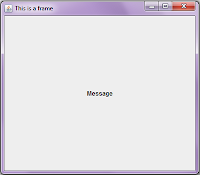
public void FrameLabel(){
JFrame JF=new JFrame("This is a frame");
JF.setSize(400, 350);
JLabel lbl=new JLabel("Message",JLabel.CENTER); //A JLabel is created stating Message alligned at the center
JF.add(lbl); //The JFrame will contain the JLabel
JF.setDefaultCloseOperation(JFrame.EXIT_ON_CLOSE);
JF.setVisible(true);
}
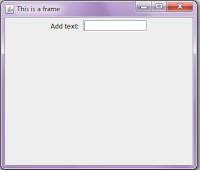
public void TxtBx(){
JFrame JF=new JFrame("This is a frame");
JF.setSize(350,300);
JF.getContentPane().setLayout(new FlowLayout()); //Change the Layouof the Frame
JF.add(new JLabel("Add text: ")); //JF will now contain a JLabel
JTextField txtbx=new JTextField(10); //Create a TextField with a specific width
JF.add(txtbx); //JF will now contain the TextBox
JF.setDefaultCloseOperation(JFrame.EXIT_ON_CLOSE);
JF.setVisible(true);
}
public void Options(){
String[] members={"Nickleus","Yao","Jake","Jul"}; //Create an Array of Strings with values
JFrame JF=new JFrame("Pick an option");
JF.setSize(250,200);
JF.getContentPane().setLayout(new FlowLayout());
JF.add(new JLabel("List of members"));
JComboBox cb=new JComboBox(); //Create a JCombobox
cb.addItem("Members"); //Add an Item in the JComboBox
for(int ctr=0;ctr
public void Buttons(){
JFrame JF=new JFrame("Pick an option");
JF.getContentPane().setLayout(new FlowLayout());
JF.add(new JLabel("Click"));
//Set an image to be an Icon
ImageIcon ic = new ImageIcon("https://blogger.googleusercontent.com/img/b/R29vZ2xl/AVvXsEioi5DYPzAvh4M3L5QVAXIj4A84BmNEdHArTME8f_XE1CGQvlTOF6s7eprDUIHuJ0iyaYzmLVNGjdzFsLeThybqRIgAsTHE0l55rSkDcCBtUwkumn-VRfZMZSGcSAJuHg5SQgQ9P_yYt0o/");
JButton bt=new JButton("Click me",ic);
bt.setSize(150, 100); //Set the size of the button
bt.setToolTipText("You can click this"); //Create a message when mouse hovers on the button
JF.add(bt);
JF.pack();
JF.setDefaultCloseOperation(JFrame.EXIT_ON_CLOSE);
JF.setVisible(true);
}
public void Password(){
JPasswordField pf=new JPasswordField(10); //Create a password field with a width of 10 pixels
JFrame JF=new JFrame("pass");
JF.getContentPane().setLayout(new GridLayout(2,2)); //set the Frame with a GridLayout
JF.add(new JLabel("User name: "));
JTextField txtbx=new JTextField(10);
JF.add(txtbx);
JF.add(new JLabel("Password: "));
JF.add(pf);
JF.setDefaultCloseOperation(JFrame.EXIT_ON_CLOSE);
JF.pack();
JF.setVisible(true);
}

public void TxtArea(){ //Show a text Area
JFrame JF=new JFrame("This is a frame");
JF.setLayout(new FlowLayout());
JF.add(new JLabel("Add text: "));
JTextArea txtbx=new JTextArea(10,15); // A text area with the specified text, rows, and columns
JF.add(txtbx);
JF.setDefaultCloseOperation(JFrame.EXIT_ON_CLOSE);
JF.pack(); //Frame authomatically has an initial size base on its contents
JF.setVisible(true);
}
Image

Thursday, February 3, 2011

Immigration from C to java[to be finished]


In CIn java

main(){
/*Code here*/
}

public static void main(String[] args) {
/*Code here*/
}

int num;
printf("Enter a number: ");
scanf("%d",&num);

Scanner scn=new Scanner(System.in);
System.out.print("Enter a number to a variable: ");
int num=scn.nextInt();
//end of solution 1

//Start of solution 2
int num;
Scanner scn=new Scanner(System.in);
System.out.print("Enter a number to a variable: ");
num=scn.nextInt();

int x=0;
printf("x+1= %d\n",x+1);

int x=0;
System.out.println("x+1= "+(x+1));

char word[10];
printf("Enter a word: ");
scanf("%s",word);
String word;
System.out.print("Enter a word: ");
word=scn.next();
//scn is a defined scanner object from the code above

int ArrInt[5];
int[] ArrInt=new int[5]

Sunday, January 2, 2011

Happy new year

Its a new year 2011. Hope it for a prosperous and good year. The challenges will come but it can be beaten. My academic life needs improvement. I will turn 18 this year. Oh boy this could be problematic. I think I can apply ads this year so hope to earn money on my own also.

Sunday, November 28, 2010

Dealing with link list in C

Link lit in c is a challenging lesson but I am grateful that I learned it.
it was such a practical lesson. Though I still prefer to program arrays, I still find dynamic memory allocation handy. I have learned techniques that are handy.

#include <stdio.h>
#include <stdlib.h>
#include <string.h>

#define MAX_C 200
typedef char string7[8];
typedef char string25[26];

typedef struct
{
string25 first, last;
char mid;
}nameType;

struct courseTag
{
string7 courseCode;
float units, grade;
nameType facultyName;
};
typedef struct courseTag arrCourses[MAX_C];

struct studentTag
{
nameType name;
arrCourses course;
int numCourse;
float CGPA;
struct studentTag *pLink;
};
typedef struct studentTag *ptrStudent; /*this alias can be used to avoid confusion in using an asterisk*/
/*you can not use the same typedef call like nameType in studentTag, because you will be calling the alias that hasn't been declared yet*/

/*This function allows to insert node in alphabetical order*/
void insert(ptrStudent *pFirst){/*Alphabtical insertion*/
char tmp;
ptrStudent pNew,pRun,pLast;
pNew=malloc(sizeof(struct studentTag));
printf("Enter first name: ");
fgets(pNew->name.first,sizeof(string25),stdin);
printf("Enter miidle intial: ");
scanf("%c%c",&pNew->name.mid,&tmp);
printf("Enter last name: ");
fgets(pNew->name.last,sizeof(string25),stdin);
pNew->pLink=NULL;
if(*pFirst==NULL)
*pFirst=pNew;
else
if(strcmp((*pFirst)->name.last,pNew->name.last)>0)
{
pNew->pLink=*pFirst;
*pFirst=pNew;
}
else {
pRun=*pFirst;
while(pRun!=NULL&&strcmp(pRun->name.last,pNew->name.last)<0)
{
pLast=pRun;
pRun=pRun->pLink;
}
if(pRun)
pNew->pLink=pRun;
pLast->pLink=pNew;

}

}

Wednesday, November 10, 2010

Team trouble

Currently, we are suppose to be working on are term paper and presentation of it.
Somehow it seems that it can't be done since we have not even researched and do other important task for it. Unfortunately my schedule conflicts and their schedules are different from mine.

We need to be organized. I need a good grade in the report and presentation. I hope this won't end bad. My studies are important. My subjects are conflicting with me. I hope I get it together and so can the others

Friday, November 5, 2010

I realized form C programming

I have been studying c programming for the past months and I am in a good pace but I wish I can learn faster. It takes a month for me to learn the c language. It takes even longer to improve it. My skills improve with practice practice practice. I have no plans on stopping because I like doing it. I have passion for programming which is why I pursue learning it. I plan to learn other languages now.#

I am interested in object oriented programming. I saw this site http://www.programmersheaven.com/2/VB-NET-School and I learned Vb at a nice pace. I still want to learn more though. I plan to learn windows forms. I also want to learn c++

The other platform is java. I learned some basic java (luckily it is similar to c). Net beans helped a lot. I plan to learn more about it some other time.

I realized that it is effective to learn one platform at a time to save me from more confusion. I have confirmed that having passion on subjects you're passionate about can really makes effective learning.

I wish what I learn can help me in the future.